
CAS360 by CompTech International · The web-based successor to TravelMan

Accounting for any business, in your browser

CAS360 works for any trade, and has special tools for travel agencies, tour operators and cargo companies. Enter a ticket, a tour or an air waybill once, and it makes the invoice and the accounting entries.

  • IRD compliant
  • ISO 9001:2015 aligned
  • Bikram Sambat dates
  • No sign-up to try
cas360.app
Ask AI: hard questions, then a whole booking from one sentence

Made for the accountant and the owner

Your accountant will trust it. You will understand it.

CAS360 keeps the books the way an accountant expects, down to the last voucher and VAT line. It shows the owner the same books in plain words: what came in, what went out, and who still owes you. No accounting course needed.

For accountants

Proper books, done faster

  • Vouchers, ledgers, trial balance and VAT registers, kept the IRD way
  • A whole invoice in 25 seconds, without touching the mouse
  • Bills numbered only after approval, and nothing is ever deleted
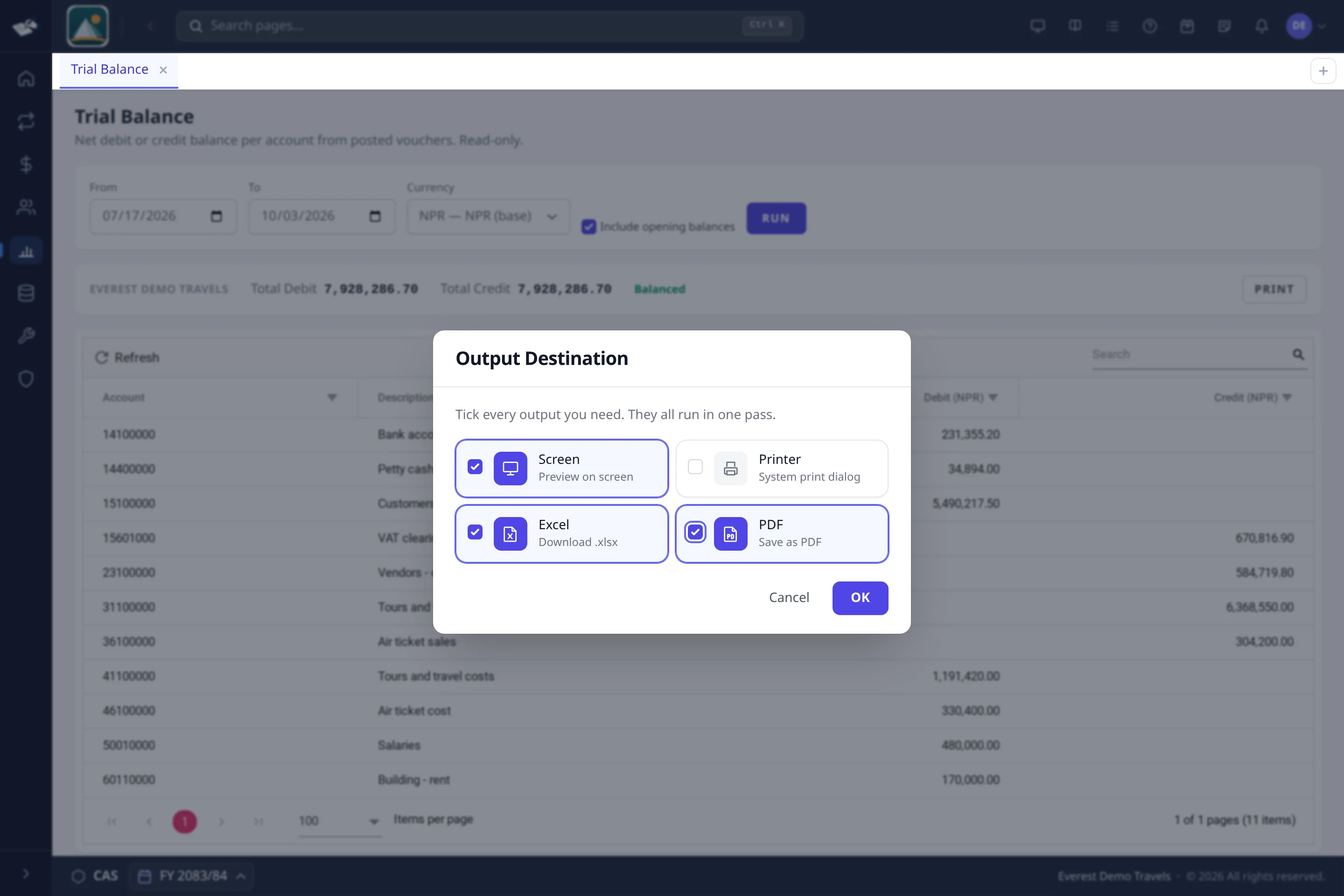
  • Any report to screen, printer, Excel or PDF in one go
For owners

Your business, in plain words

  • Ask “how much did we sell this month?” in English, Nepali or Japanese
  • Money in, money out and who owes you, on one page
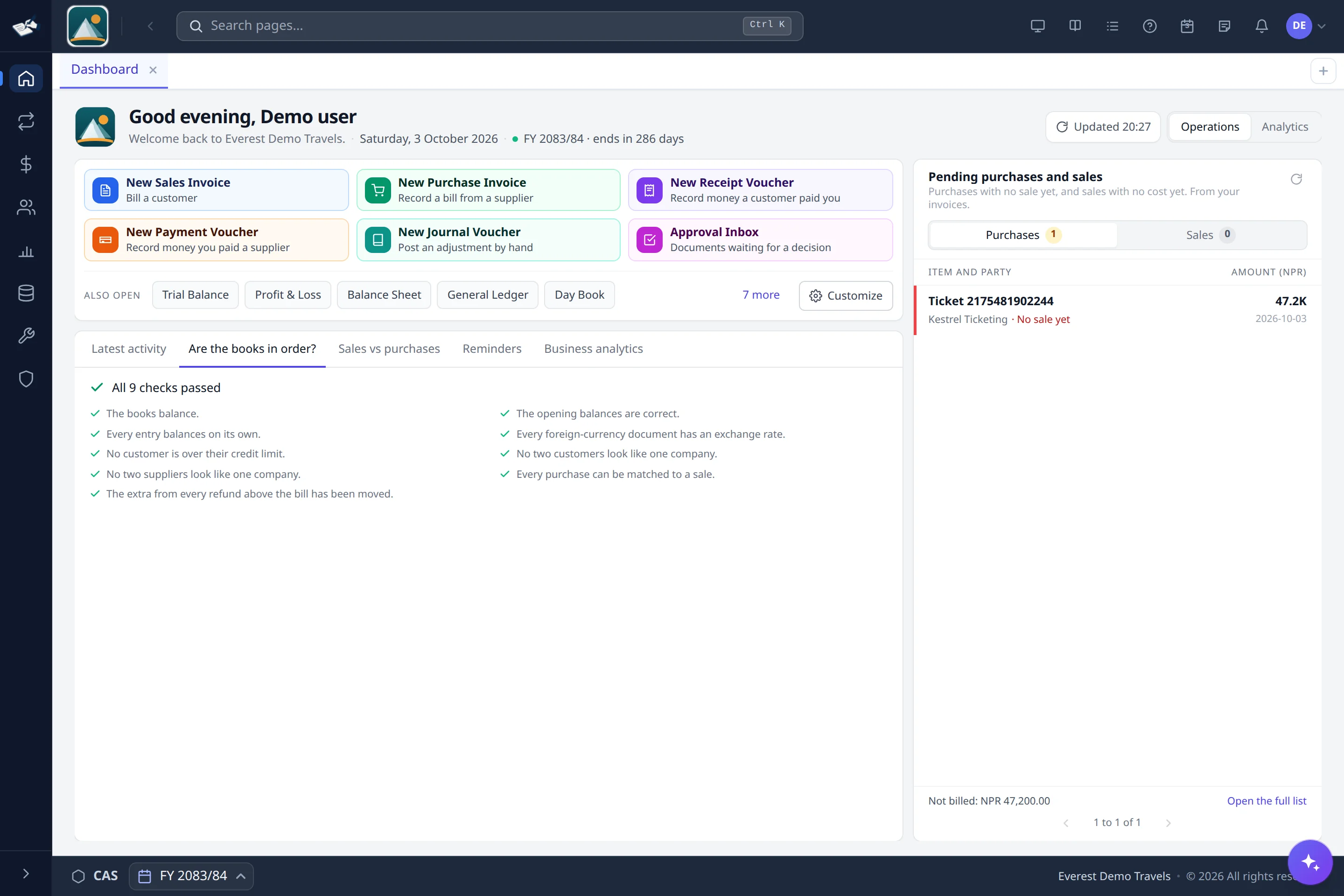
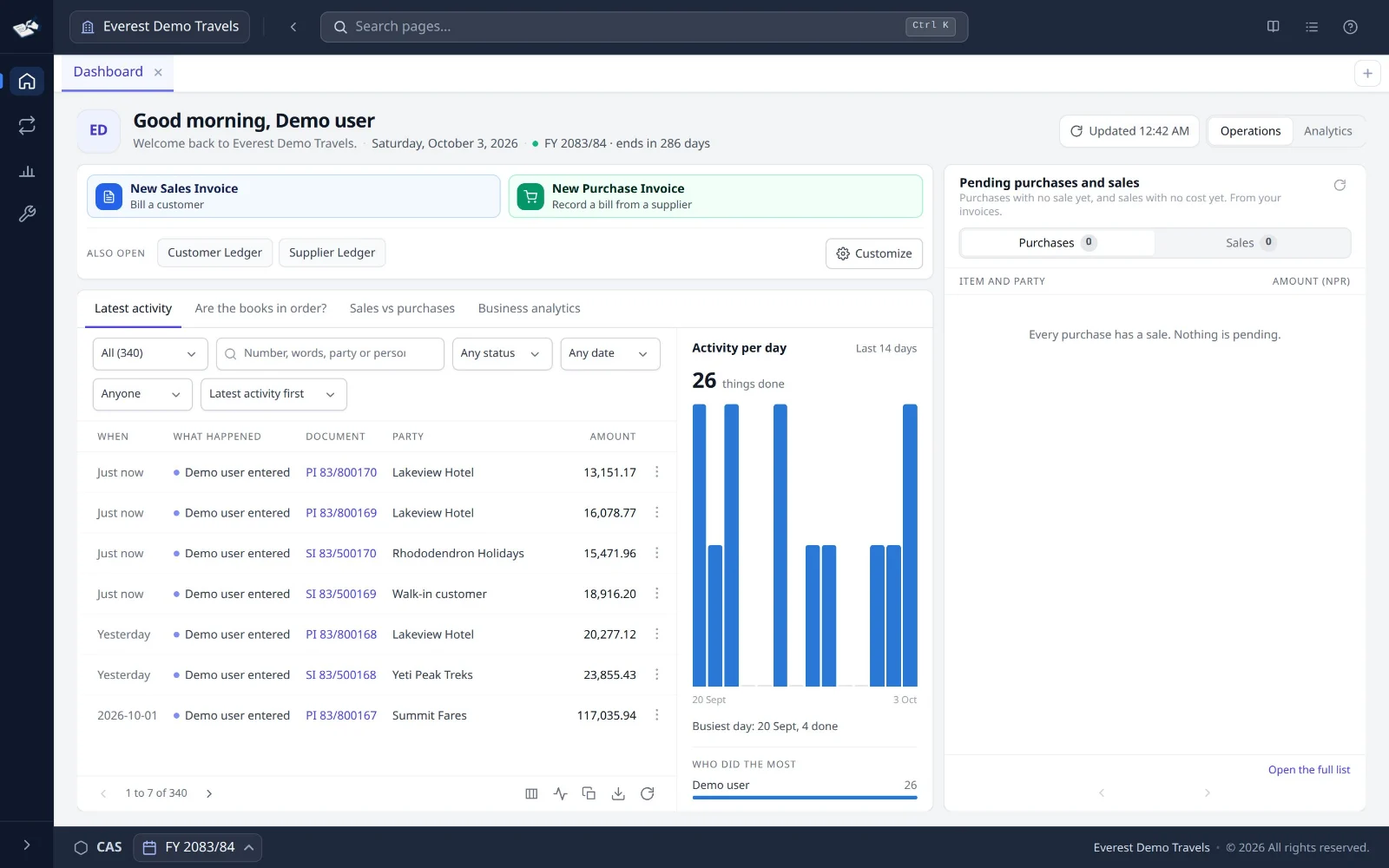
  • Nine checks on the home page tell you if the books are in order
  • Say a receipt in one sentence, and CAS360 fills it in for you to check

The same books and the same numbers, for both of you.

cas360.app
Speed

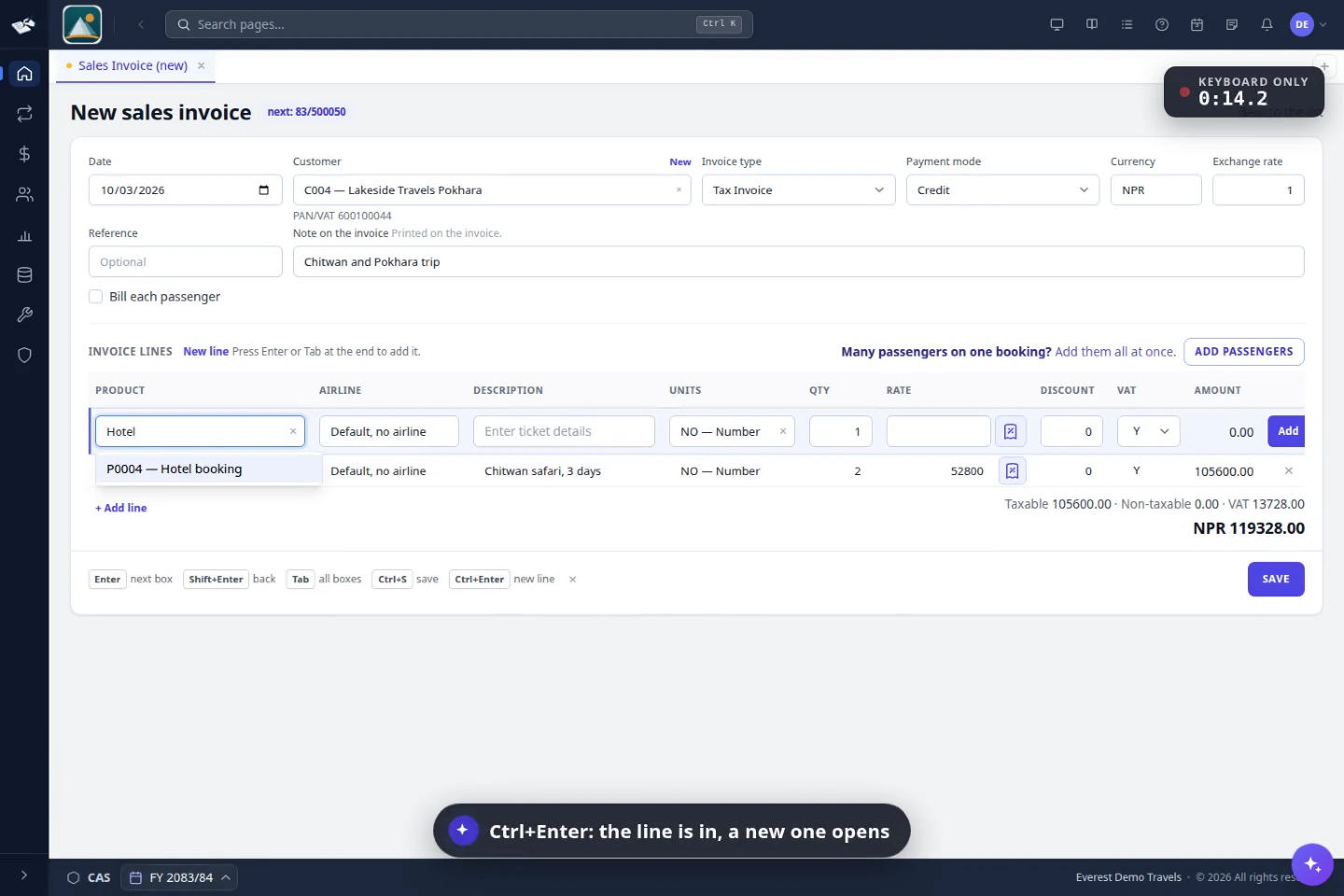
A whole invoice in 25 seconds, without the mouse

Enter moves to the next box, Ctrl+Enter adds a line, Ctrl+S saves. VAT and totals work themselves out as you type, so a counter clerk never has to leave the keyboard.

  • Shortcuts shown on every invoice
  • Alt+N adds a new customer without leaving the bill
  • Ctrl+K jumps to any page
Keyboard-firstReal time on the stopwatch
cas360.app
Zero retyping

Buy once. The sale arrives filled.

Post a ticket purchase and choose “Post and create sales”: the sale opens with the ticket, passenger and customer already in. If it is priced at or below cost, CAS360 asks before it posts.

  • Cost and margin shown live on the invoice
  • It works the other way too: the sale fills the purchase
  • Ticket search and a ticket ledger
Margin checkMade for travel
cas360.app
Live insight

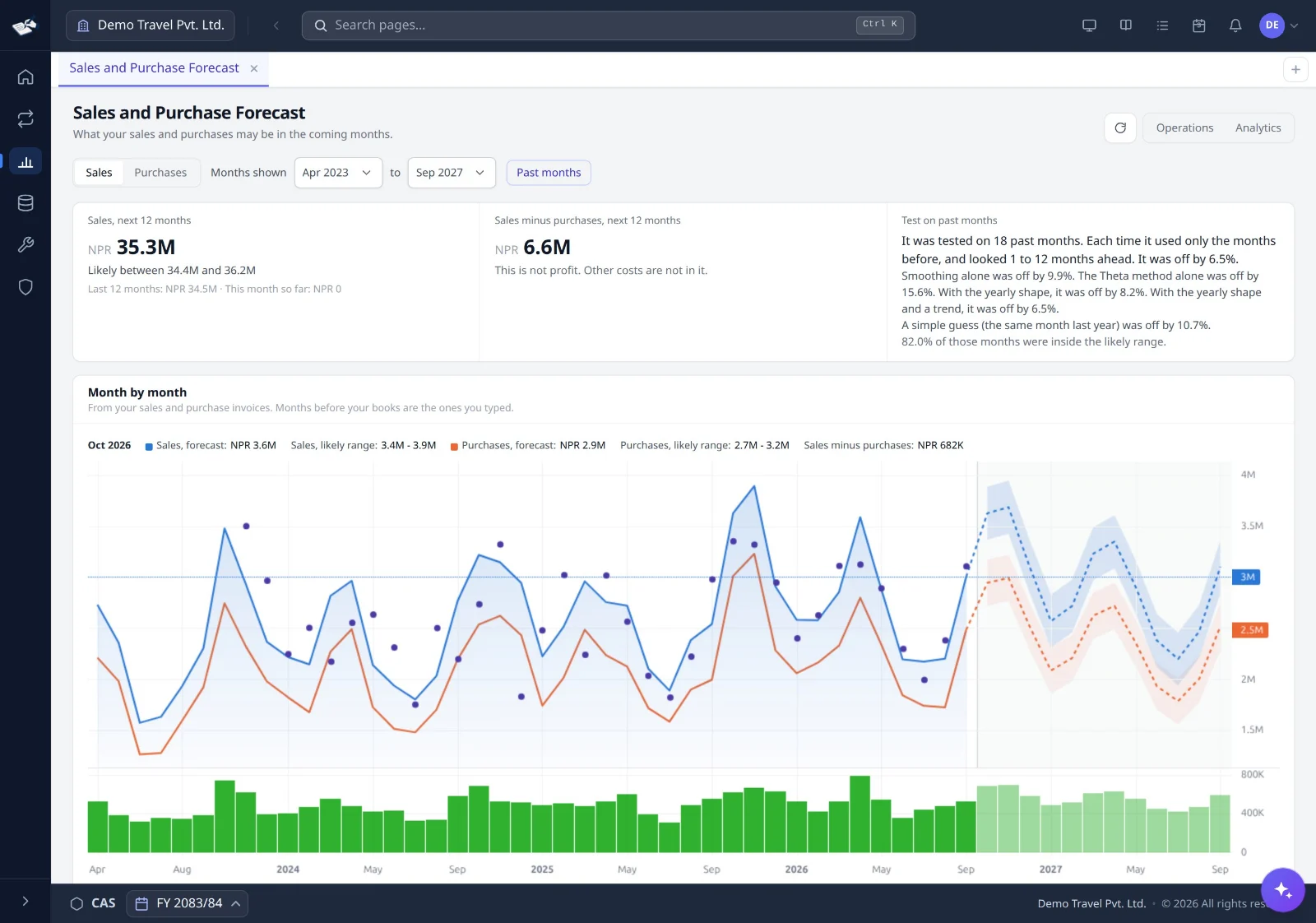
Click any figure. See every record behind it.

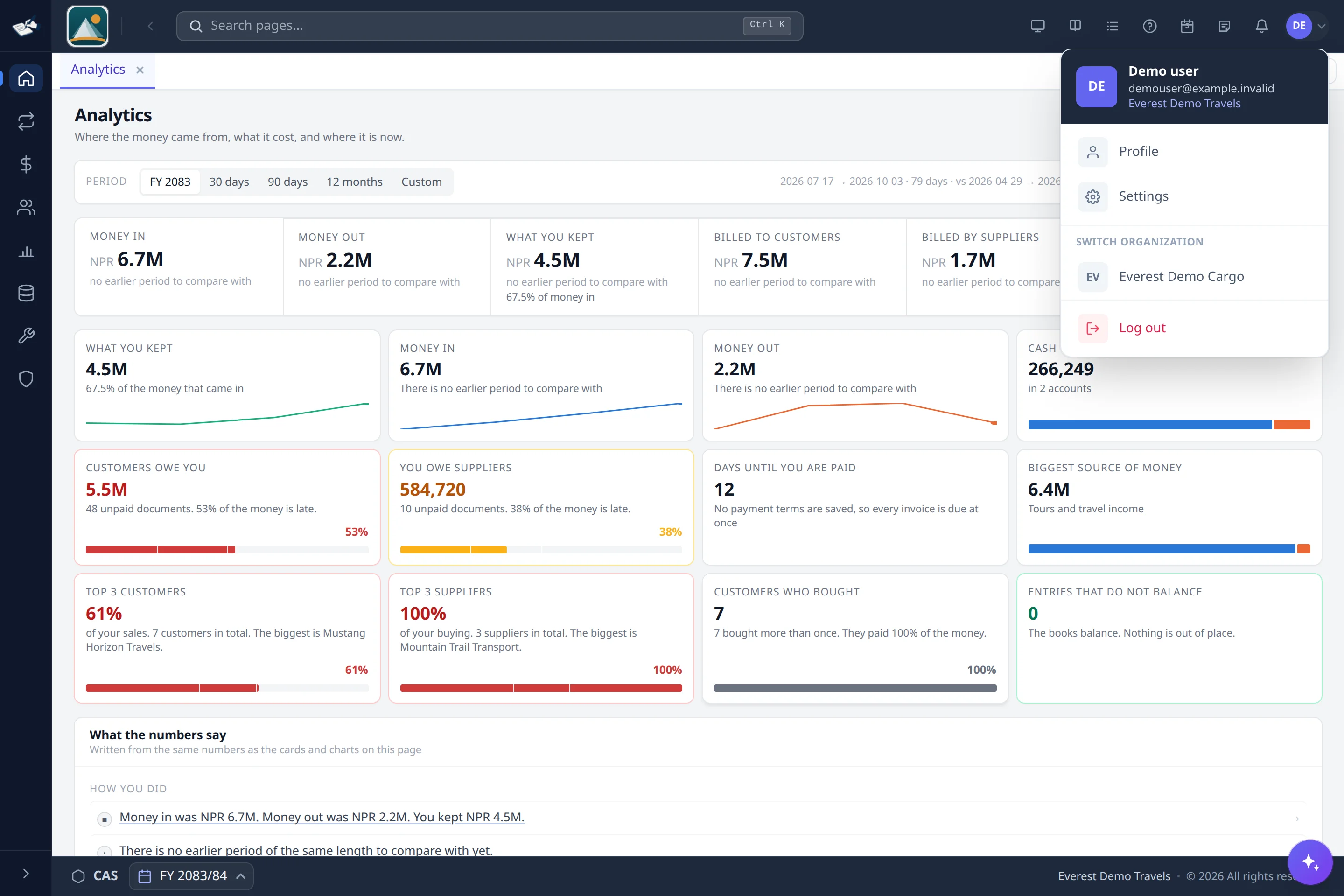
Money in, money out, what you kept and who owes you, for any period and compared with the one before. Every figure comes from your posted books and opens to the ledger behind it.

  • Who owes you, and how late
  • Customers billing far below their usual month
  • Big one-off bills that make a month look bigger
Drill-downAny period
cas360.app
Audit-ready

No number until approval. A filed bill stays filed.

Turn on approvals and a draft holds a handle, not a bill number; the number is issued in order when someone approves it. Once a bill is sent to the IRD it cannot be cancelled or deleted here: a credit note is the way back. Every change keeps who, when, before and after.

  • Cancel keeps every entry; nothing is deleted
  • Dates follow the numbers
  • On-screen previews are marked PREVIEW ONLY, and prints are counted
IRD compliantISO 9001:2015 aligned
cas360.app
Auto-match

Read in the bank's statement. Matches are ticked for you.

Save the statement from your bank's website as Excel or CSV, and read it in. A line with the same amount and cheque number as your book, or the only line with that amount a few days apart, is ticked for you. You match the rest by hand. When the difference is zero, close the statement.

  • Nepali (BS) dates in the bank's file are read as they are
  • Write the bank date here, on the voucher, or from the count on the top bar
  • Bounced cheques and cheques more than six months old: the voucher that undoes them is filled for you
Excel or CSVBS datesLocked when closed

Group billing

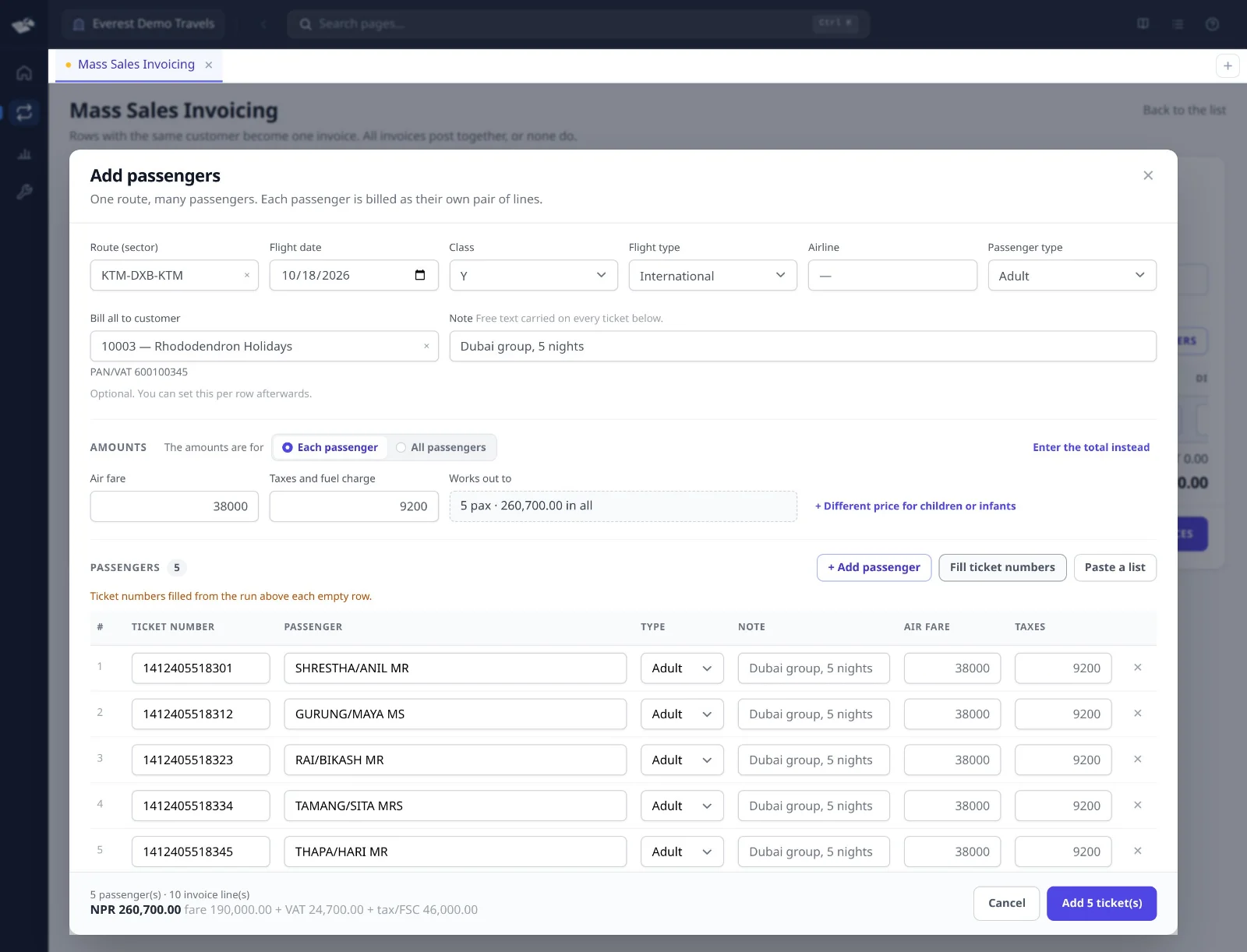
Bill a whole group in one go

Type the route and the fare once. Paste the passenger names from Excel or an email. Each passenger gets their own ticket lines, and each customer one invoice. All the invoices post together, or none do.

cas360.app

Now try it yourself

This is the real CAS360, running in your browser with a made-up travel agency. Nothing you type is sent anywhere.

Take the full demo A guided tour: sales, purchases, ledgers and the IRD posting screen.

cas360.app/demo/mass-sales-invoicing Open in a new tab

Try CAS360 here

The app opens inside this box with a made-up travel agency. No account needed.

Works best on a computer. Your work stays in this browser.

cas360.app
AI-powered

Ask your books. Get answers, and filled forms.

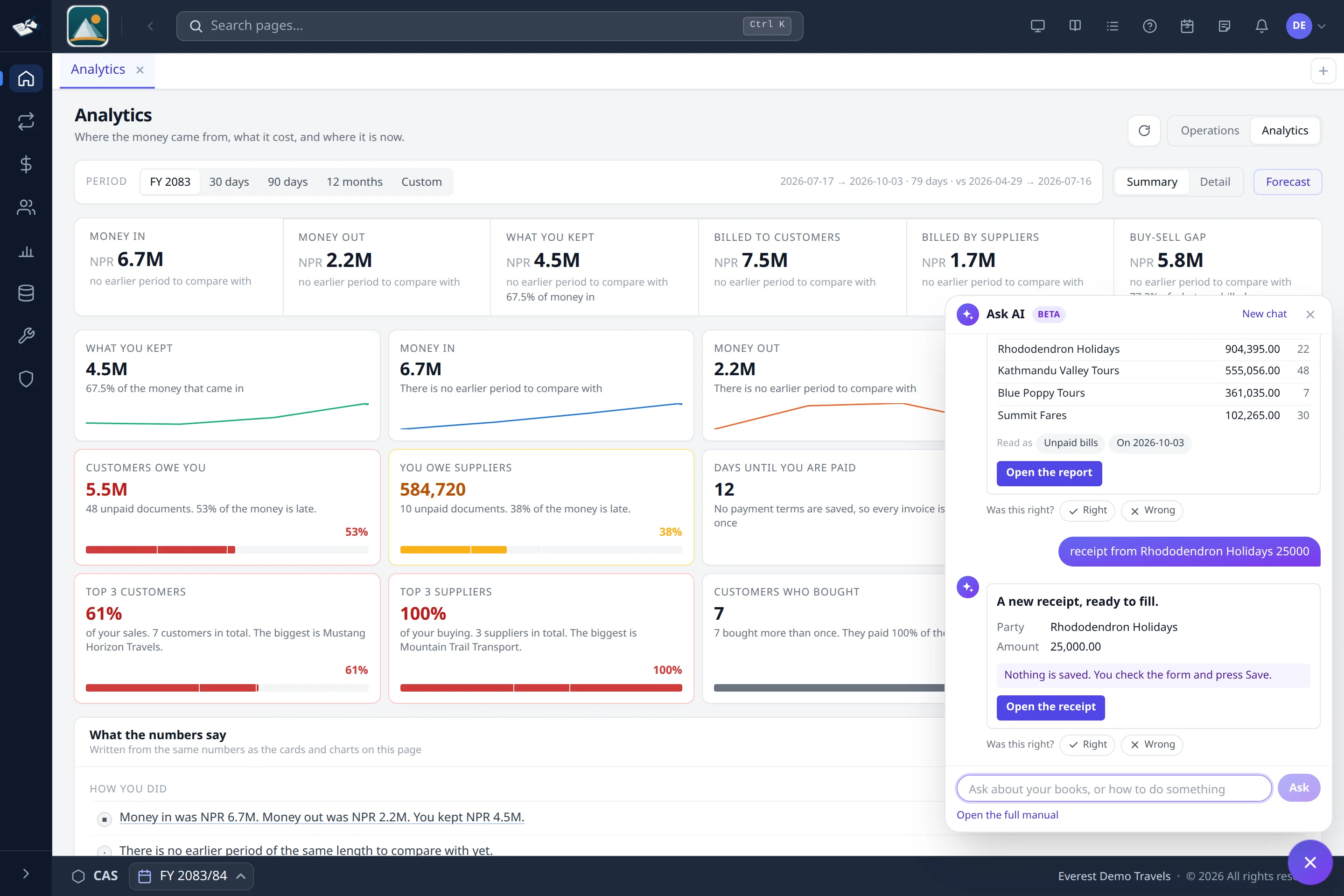
Type a question the way you would ask your accountant, in English, Nepali or Japanese, even Nepali in English letters. CAS360 answers from your own books. It compares with the period before, ranks your customers by the change, and shows profit month by month. Describe a whole booking in one sentence, with each passenger, their type, fare, taxes and ticket number, and you get a filled invoice. Answered by our own AI.

  • Real figures from your ledger, in seconds
  • Comparisons, rankings and months in one question
  • Eight kinds of form filled from one sentence: invoices, receipts, payments, vouchers and notes
  • Nothing is saved until you check it and press Save
BetaOur own AIEnglish · Nepali · JapaneseSwitched on per company

Less repeat work. More control.

Still working around your current software?

The usual problems with an old system, and what CAS360 does about each one.

01

Still making extra Excel sheets?

Get reports straight from the system: dashboards, ageing and profit for each tour. Export to PDF or Excel when you need to.

02

Doing the same work twice?

Enter the ticket, tour or air waybill once. The invoice and the accounting entries are made from it.

03

Does too much depend on one person?

Give each person their own access. Every change is recorded with the user's name and the time.

04

Need IRD-compliant billing?

Bills go to IRD from the software. An issued bill can be cancelled, but never edited.

One connected system

Entry forms made by accountants, for fast entry

Everything your office does in a day, in one place. The core works for any business. Travel, tours and cargo get their own forms.

Tours, tickets and cargo

Tour packages, air tickets and air waybills, each with the fields it needs.

Group billing

Paste a passenger list. Each passenger gets their own lines, and each customer one invoice.

Reports you can use

Dashboards, ageing, budget against actual, and profit for each tour and shipment.

Many companies, one sign-in

Separate books for each company, with access rights for each screen.

Foreign currency

Bill in dollars or any currency. Nepal Rastra Bank's rates come in every day.

Credit control

Credit limits and payment reminders, so you know who to call and when.

Stock and projects

Stock in more than one warehouse, and project accounts for any kind of work.

Core accounting

Vouchers, ledgers, bank reconciliation, trial balance, profit and loss and balance sheet, in BS dates.

  • Web browser
  • Phone
  • Windows and Linux app

Documents

Crisp documents, on screen and on paper

Real PDFs from CAS360, sharp at any zoom. Open them and look closely.

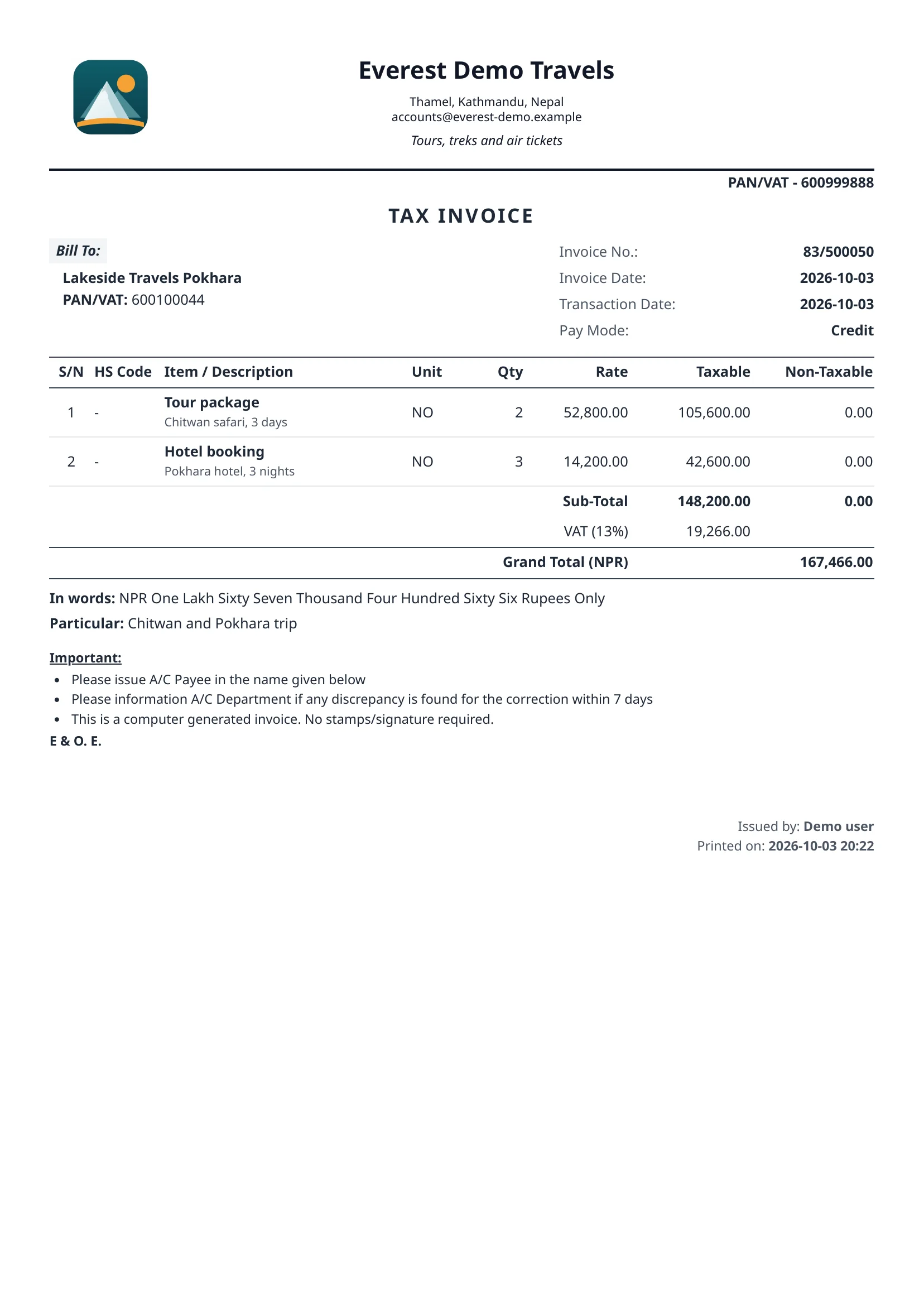
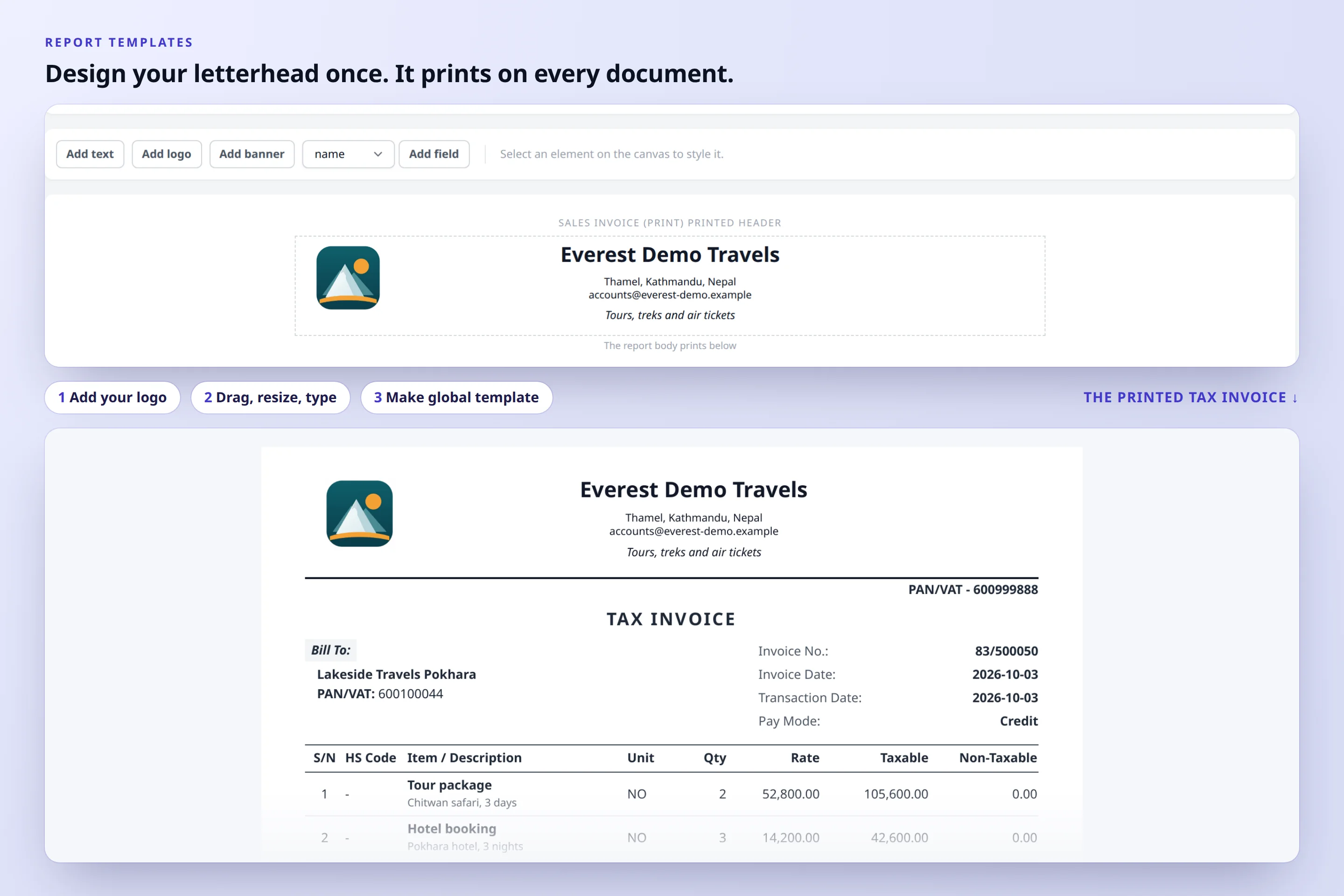
Tax invoice
Tax invoiceThe first print says TAX INVOICE. Reprints are counted copies. Open the PDF
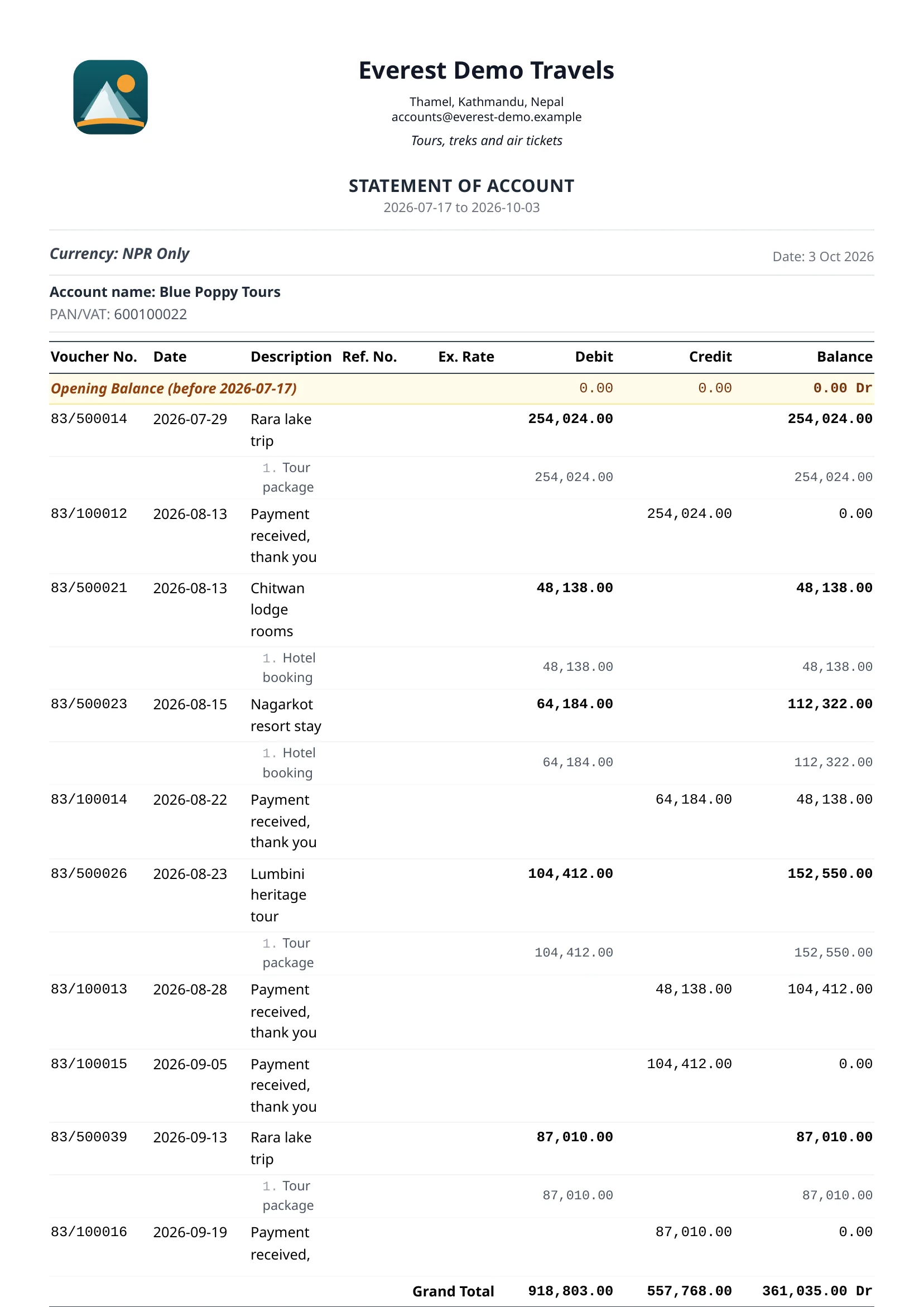
Statement of account
Statement of accountOpening balance, every entry and the balance after each one. Open the PDF
Preview and print
Preview and printLooking is free: the screen copy says PREVIEW ONLY. The printed copy is clean.

A closer look

Every corner, in detail

Click any picture to see it full size.

Compliance

Made for IRD compliance

CAS360 is IRD compliant and aligned with ISO 9001:2015. The bills, registers and records your auditor and IRD ask for are part of the system, not an add-on.

  • VAT bills sent to IRD's CBMS from the app
  • The first print says Tax Invoice. Reprints are marked as copies and counted
  • Cancelling a bill marks it cancelled. It is never deleted
  • Every edit, print, export and approval is recorded with the user and time
01

IRD reports

Anusuchi 5 and 6. VAT registers in IRD's Excel format.

02

Approval control

A draft keeps a draft number until it is approved. Bill numbers are never reused.

03

Many companies

Separate books for each company. Access rights for each screen.

CBMS e-Billing

Send bills to the IRD, and see what came back

Recorded with a made-up company. In these clips the bills went to a test server, not to the IRD.

Get the bills that have not reached the IRD yet and send them together. Each bill shows the IRD's answer.

Ask for a live demo

Call or WhatsApp us. We will show you CAS360 with your kind of business, and answer your questions on the call.

Phone: +977 9860274090 · +977 9851032716 · +977 9740262947